
Enable KeepAlive in TcpServer by Default
See original GitHub issueIt’s a long standing issue in our production environment, that the spring-cloud-gateway does not release tcp connections. Similar issues may be: https://github.com/spring-cloud/spring-cloud-gateway/issues/1233, https://github.com/spring-cloud/spring-cloud-gateway/issues/1788 and https://github.com/reactor/reactor-netty/issues/1200. We always update the component to the latest versions, but never solve the problem. With more and more clients using the gateway, tcp connections increase rapidly(10k+/week) and we cannot just ignore and do a restart fix.
After several days of investigation. I found the root cause: tcp keepalive is not set by default in TcpServer.
# cat /proc/sys/net/ipv4/tcp_keepalive_time
1800
# ss -4a -i
...
tcp   ESTAB      0      0                                                                          10.205.29.178:http                                                                                      117.136.2.41:novell-zen
         cubic wscale:8,7 rto:201 rtt:0.151/0.028 ato:40 mss:1448 cwnd:22 send 1687.7Mbps lastsnd:2912849751 lastrcv:2912849754 lastack:2912849751 pacing_rate 3361.6Mbps rcv_space:28960
tcp   ESTAB      0      0                                                                          10.205.29.178:http                                                                                    223.104.30.184:37625
         cubic wscale:8,7 rto:201 rtt:0.098/0.024 ato:40 mss:1448 cwnd:17 ssthresh:16 send 2009.5Mbps lastsnd:2896497497 lastrcv:2896497501 lastack:2896497497 pacing_rate 4013.8Mbps rcv_space:28960
tcp   ESTAB      0      0                                                                          10.205.29.178:http                                                                                      112.11.63.87:30029
         cubic wscale:8,7 rto:201 rtt:0.09/0.017 ato:40 mss:1448 cwnd:20 send 2574.2Mbps lastsnd:773102915 lastrcv:773102919 lastack:773102915 pacing_rate 5148.4Mbps rcv_space:28960
tcp   ESTAB      0      0                                                                          10.205.29.178:http                                                                                   144.123.160.130:60417
         cubic wscale:8,7 rto:201 rtt:0.114/0.012 ato:40 mss:1448 cwnd:22 send 2235.5Mbps lastsnd:488590217 lastrcv:488590221 lastack:488590217 pacing_rate 4471.0Mbps rcv_space:28960
tcp   ESTAB      0      0                                                                          10.205.29.178:http                                                                                     223.72.91.230:56203
         cubic wscale:8,7 rto:201 rtt:0.154/0.098 ato:40 mss:1448 cwnd:20 send 1504.4Mbps lastsnd:1365713583 lastrcv:1365713587 lastack:1365713583 pacing_rate 2996.7Mbps rcv_space:28960
tcp   ESTAB      0      0                                                                          10.205.29.178:http                                                                                    112.96.109.158:51560
         cubic wscale:8,7 rto:201 rtt:0.232/0.021 ato:40 mss:1448 cwnd:22 send 1098.5Mbps lastsnd:1377039985 lastrcv:1377039988 lastack:1377039985 pacing_rate 2188.7Mbps rcv_space:28960
tcp   ESTAB      0      0                                                                          10.205.29.178:http                                                                                     112.96.64.161:43707
         cubic wscale:8,7 rto:201 rtt:0.504/0.138 ato:40 mss:1448 cwnd:22 ssthresh:22 send 505.7Mbps lastsnd:430545324 lastrcv:430545327 lastack:430545323 pacing_rate 1009.8Mbps rcv_space:28960
...
lastsnd and lastrcv values are much larger than the keepalive settings. So the solution is straight forward, by adding a netty customizer:
    @Bean
    public NettyServerCustomizer nettyServerCustomizer() {
        return httpServer -> httpServer.tcpConfiguration(tcpServer -> {
            tcpServer= tcpServer.option(ChannelOption.SO_KEEPALIVE, true);
            /*
             * We are modifying child handler, use doOnBind() instead of doOnConnection().
             */
            tcpServer = tcpServer.doOnBind(serverBootstrap ->
                    BootstrapHandlers.updateConfiguration(serverBootstrap, "channelIdle", (connectionObserver, channel) -> {
                        ChannelPipeline pipeline = channel.pipeline();
                        pipeline.addLast(new ReadTimeoutHandler(10, TimeUnit.MINUTES));
                        //pipeline.addLast(new WriteTimeoutHandler(10, TimeUnit.MINUTES));
                    }));
            return tcpServer;
        });
    }
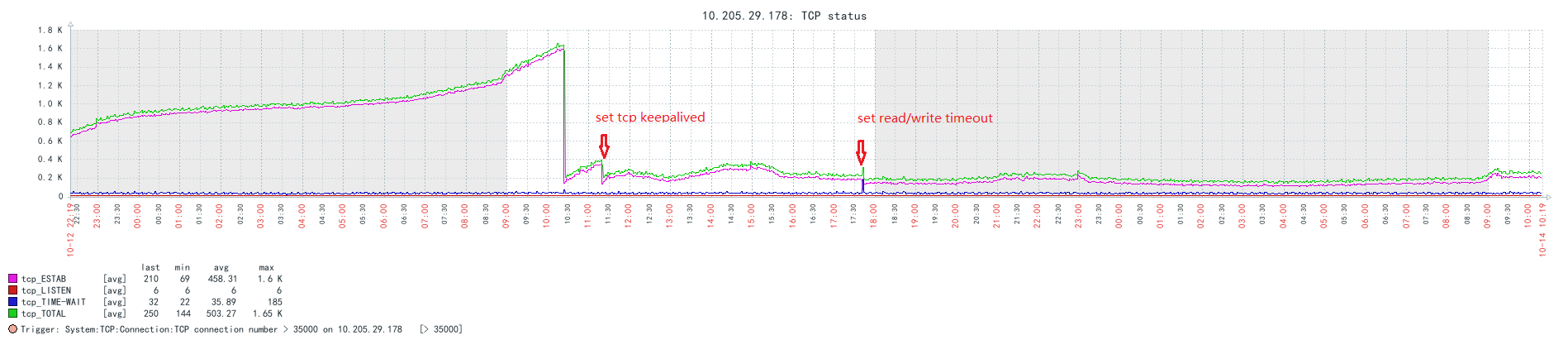
I also add an application-level read timeout handler. After the change, connections do begin to decrease. So I’m suggesting to add the keepalive setting by default, either in spring-cloud-gateway or in reactor-netty. With this change, the TcpServer will do the right thing out of box.
Zabbix trend of tcp connections:
Issue Analytics
- State:

- Created 3 years ago
- Reactions:5
- Comments:19 (6 by maintainers)
 Top Results From Across the Web
 Top Related Medium Post
 Top Related StackOverflow Question
 Troubleshoot Live Code
 Top Related Reddit Thread
 Top Related Hackernoon Post
 Top Related Tweet
 Top Related Dev.to Post
 Top Related Hashnode Post
@EdwardKuenen Check the previous comment
httpServer.idleTimeout(Duration.ofMillis(1))step 1:change default reactor-netty version
step2: modify idle timeout args