
Errors installing electron-serialport example on windows 10
See original GitHub issuei followed the instructions to install and run the electron-serialport example project, but am encountering the following error when installing on windows 10, node: v14.17.3, npm: 6.14.13
PS C:\Users\rannug\Documents\work\electron-serialport> npm install
npm WARN read-shrinkwrap This version of npm is compatible with lockfileVersion@1, but package-lock.json was generated for lockfileVersion@2. I'll try to do my best with it!
(node:1280) [DEP0123] DeprecationWarning: Setting the TLS ServerName to an IP address is not permitted by RFC 6066. This will be ignored in a future version.
(Use `node --trace-deprecation ...` to show where the warning was created)
npm WARN deprecated node-pre-gyp@0.11.0: Please upgrade to @mapbox/node-pre-gyp: the non-scoped node-pre-gyp package is deprecated and only the @mapbox scoped package will recieve updates in the future
npm WARN deprecated request@2.88.2: request has been deprecated, see https://github.com/request/request/issues/3142
npm WARN deprecated har-validator@5.1.5: this library is no longer supported
npm WARN deprecated uuid@3.4.0: Please upgrade to version 7 or higher. Older versions may use Math.random() in certain circumstances, which is known to be problematic. See https://v8.dev/blog/math-random for details.
> lzma-native@6.0.1 install C:\Users\rannug\Documents\work\electron-serialport\node_modules\lzma-native
> node-pre-gyp install --fallback-to-build && rimraf build
node-pre-gyp WARN Using request for node-pre-gyp https download
[lzma-native] Success: "C:\Users\rannug\Documents\work\electron-serialport\node_modules\lzma-native\binding-v6.0.1-n-api-win32-x64\lzma_native.node" is installed via remote
> @serialport/bindings@9.2.0 install C:\Users\rannug\Documents\work\electron-serialport\node_modules\@serialport\bindings
> prebuild-install --tag-prefix @serialport/bindings@ || node-gyp rebuild
> core-js@3.15.2 postinstall C:\Users\rannug\Documents\work\electron-serialport\node_modules\core-js
> node -e "try{require('./postinstall')}catch(e){}"
Thank you for using core-js ( https://github.com/zloirock/core-js ) for polyfilling JavaScript standard library!
The project needs your help! Please consider supporting of core-js on Open Collective or Patreon:
> https://opencollective.com/core-js
> https://www.patreon.com/zloirock
Also, the author of core-js ( https://github.com/zloirock ) is looking for a good job -)
> electron@13.1.7 postinstall C:\Users\rannug\Documents\work\electron-serialport\node_modules\electron
> node install.js
> electron-serialport@1.0.2 install C:\Users\rannug\Documents\work\electron-serialport
> electron-rebuild
⠦ Building module: bindings, Completed: 0Building the projects in this solution one at a time. To enable parallel build, please add the "/m" switch.
⠙ Building module: bindings, Completed: 0 serialport.cpp
⠦ Building module: bindings, Completed: 0c:\users\rannug\.electron-gyp\13.1.7\include\node\v8.h(1652): error C2059: syntax error: '' [C:\Users\rannug\Documents\
work\electron-serialport\node_modules\@serialport\bindings\build\bindings.vcxproj]
c:\users\rannug\.electron-gyp\13.1.7\include\node\v8.h(1654): error C2238: unexpected token(s) preceding ';' [C:\Users\
rannug\Documents\work\electron-serialport\node_modules\@serialport\bindings\build\bindings.vcxproj]
c:\users\rannug\.electron-gyp\13.1.7\include\node\v8.h(1670): error C2061: syntax error: identifier 'ResolveCallback' [
C:\Users\rannug\Documents\work\electron-serialport\node_modules\@serialport\bindings\build\bindings.vcxproj]
c:\users\rannug\.electron-gyp\13.1.7\include\node\v8.h(7292): error C2059: syntax error: '' [C:\Users\rannug\Documents\
work\electron-serialport\node_modules\@serialport\bindings\build\bindings.vcxproj]
c:\users\rannug\.electron-gyp\13.1.7\include\node\v8.h(8652): error C2061: syntax error: identifier 'HostImportModuleDy
namicallyCallback' [C:\Users\rannug\Documents\work\electron-serialport\node_modules\@serialport\bindings\build\bindings
.vcxproj]
✖ Rebuild Failed
node-gyp failed to rebuild 'C:\Users\rannug\Documents\work\electron-serialport\node_modules\@serialport\bindings'.
Error: node-gyp failed to rebuild 'C:\Users\rannug\Documents\work\electron-serialport\node_modules\@serialport\bindings'.
Error: `C:\Program Files (x86)\MSBuild\14.0\bin\MSBuild.exe` failed with exit code: 1
at ModuleRebuilder.rebuildNodeGypModule (C:\Users\rannug\Documents\work\electron-serialport\node_modules\electron-rebuild\lib\src\module-rebuilder.js:193:19)
at processTicksAndRejections (internal/process/task_queues.js:95:5)
at async Rebuilder.rebuildModuleAt (C:\Users\rannug\Documents\work\electron-serialport\node_modules\electron-rebuild\lib\src\rebuild.js:190:9)
at async Rebuilder.rebuild (C:\Users\rannug\Documents\work\electron-serialport\node_modules\electron-rebuild\lib\src\rebuild.js:152:17)
at async C:\Users\rannug\Documents\work\electron-serialport\node_modules\electron-rebuild\lib\src\cli.js:146:9
npm ERR! code ELIFECYCLE
npm ERR! errno 4294967295
npm ERR! electron-serialport@1.0.2 install: `electron-rebuild`
npm ERR! Exit status 4294967295
npm ERR!
npm ERR! Failed at the electron-serialport@1.0.2 install script.
npm ERR! This is probably not a problem with npm. There is likely additional logging output above.
npm ERR! A complete log of this run can be found in:
npm ERR! C:\Users\rannug\AppData\Roaming\npm-cache\_logs\2021-07-19T19_31_09_998Z-debug.log
PS C:\Users\rannug\Documents\work\electron-serialport> node -v
v14.17.3
PS C:\Users\rannug\Documents\work\electron-serialport> npm -v
6.14.13
PS C:\Users\rannug\Documents\work\electron-serialport>```
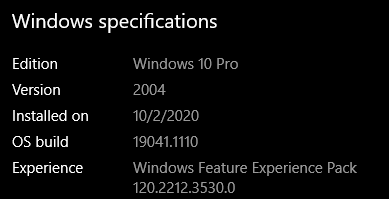
Any help to resolve the error would be appreciated, Thank you.Issue Analytics
- State:

- Created 2 years ago
- Reactions:1
- Comments:6 (5 by maintainers)
 Top Results From Across the Web
Tracking Electron support · Issue #538 · serialport/node ...
I have an Electron desktop app that requires some nodejs packages including serialport. But only serialport is failed to require. I included it...
Read more >apm/npm serialport fail to load on Windows 10 - Stack Overflow
I'm building an Atom plugin that need to use the serial port. I've npm install --save serialport and it seem to work but...
Read more >Installing SerialPort
For an example Electron project, check out electron-serialport . NW.js. NW.js is an app runtime based on Chromium and node.js. Like Electron, ...
Read more >EmergingTechnologyAdvisors/node-serialport - Gitter
Hello, I am having issues downloading serialport. I have node v10.3.0. I have seen many more of install issues with serialport but none...
Read more >serialport-builds-electron - npm package - Snyk
Windows 7, Windows 8.1, and Windows 10 are supported. Might just download and install with no extra steps. If the downloaded binary fails...
Read more > Top Related Medium Post
No results found
 Top Related StackOverflow Question
No results found
 Troubleshoot Live Code
Lightrun enables developers to add logs, metrics and snapshots to live code - no restarts or redeploys required.
Start Free Top Related Reddit Thread
No results found
 Top Related Hackernoon Post
No results found
 Top Related Tweet
No results found
 Top Related Dev.to Post
No results found
 Top Related Hashnode Post
No results found
I followed the instructions in the node-gyp link and it is happy now 😃
Thank you so much for helping me figure it out, really appreciate it! just wish native modules werent so complicated in node 😃
Sorry, I did not check or try to troubleshoot/diagnose further.