
Translation files ignored with "rejecting language code not found in supportedLngs" warning
See original GitHub issue🐛 Bug Report
I am writing a React SPA with i18next and react-i18next using create-react-app. When I load my app in the browser, I get many warnings of the following kind:
i18next.js:22 i18next::languageUtils: rejecting language code not found in supportedLngs: en-GB
i18next.js:22 i18next::languageUtils: rejecting language code not found in supportedLngs: en
as well as
i18next.js:22 i18next::translator: key "navBar.signIn" for languages "" won't get resolved as namespace "common" was not yet loaded This means something IS WRONG in your setup. You access the t function before i18next.init / i18next.loadNamespace / i18next.changeLanguage was done. Wait for the callback or Promise to resolve before accessing it!!!
I don’t know why this happens, because all my translation files are present, in particular the en-GB one, and I use the <Suspense/> component.
To Reproduce
My index.tsx looks like this:
import React, { Suspense } from "react"
import ReactDOM from "react-dom"
import { BrowserRouter } from "react-router-dom"
import { MsalProvider } from "@azure/msal-react"

import App from "./App"
import { msalInstance } from "./auth"
import "./i18n"

function LoadingComponent() {
    return (
        <div>
            <h1>Loading...</h1>
        </div>
    )
}

ReactDOM.render(
    <React.StrictMode>
        <BrowserRouter basename={process.env.PUBLIC_URL}>
            <MsalProvider instance={msalInstance}>
                <Suspense fallback={<LoadingComponent/>}>
                    <App />
                </Suspense>
            </MsalProvider>
        </BrowserRouter>
    </React.StrictMode>,
    document.getElementById("root")
)
My i18n.ts looks like this:
import i18next, { InitOptions } from "i18next"
import HttpApi from "i18next-http-backend"
import { initReactI18next } from "react-i18next"

const options: InitOptions = {
    supportedLngs: ["en-GB", "de-DE", "zh-CN"],
    lng: "en-GB",
    fallbackLng: "en-GB",
    interpolation: {
        escapeValue: false // React already prevents XSS attacks
    },
    ns: ["common", "device", "myDevices"],
    defaultNS: "common",
    debug: process.env.NODE_ENV === "development"
}

i18next
    .use(HttpApi)
    .use(initReactI18next)
    .init(options)
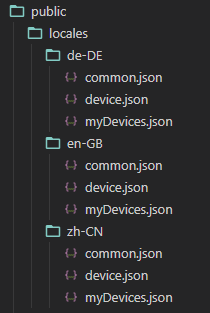
and my public folder contains the translation files:
What’s wrong here?
Your Environment
- runtime: node 14.15.5, Chrome 88.0.4324.190
- i18next: 19.9.1
- i18next-http-backend: 1.1.1
- react-i18next: 11.8.8",
- os: Windows 8.1
Issue Analytics
- State:

- Created 3 years ago
- Comments:6 (3 by maintainers)
 Top Results From Across the Web
i18next::languageUtils: rejecting language code not found in ...
and placed the localization translation file at public/locales/en-us/translation.json. I have added supportedLngs because I want my i18next-http ...
Read more >Excessive console.warns for rejected language codes #1233
When a language code is rejected due to not being in supportedLngs and a fallback language is resolved, subsequent translation calls should ...
Read more >Configuration Options - i18next documentation
language to use if translations in user language are not available. Setting it explicitly to false ... E.g. en-US will be valid if...
Read more >A Guide to React Localization with i18next | Phrase
What happens when i18next does not find a translation message for a given key? This might happen because the active language is not...
Read more >Working with Translation Files - Business Central
Dynamics 365 Business Central is multi-language enabled, which means that you can display the user interface (UI) in different languages. In ...
Read more > Top Related Medium Post
No results found
 Top Related StackOverflow Question
No results found
 Troubleshoot Live Code
Lightrun enables developers to add logs, metrics and snapshots to live code - no restarts or redeploys required.
Start Free Top Related Reddit Thread
No results found
 Top Related Hackernoon Post
No results found
 Top Related Tweet
No results found
 Top Related Dev.to Post
No results found
 Top Related Hashnode Post
No results found
sure…contributions are very welcome
Ok, I will do that tomorrow. Thanks again.