
EAS update crashes app, and update changes are not applied to app
See original GitHub issueSummary
I usually use expo publish to make OTA updates, but since EAS update became free for all users I wanted to use it from now on since it seems to be the future of OTA updates using expo.
I configured eas update, and changed eas.json to include a channel as the following:
"preview": {
      "distribution": "internal",
      "channel": "preview"
    }
relevant changes in app.json:
"updates": {
      "fallbackToCacheTimeout": 5000,
      "url": "https://u.expo.dev/44de205a-7c61-4abf-ba6a-c1eba82cd4c8"
    },
...
"runtimeVersion": {
      "policy": "nativeVersion"
    }
I have created a new android preview build, made changes, and made an eas update to preview branch with the following result:
❯ eas update
✔ Linked to project @feedme_cyprus/feedme-cyprus
✔ Which branch would you like to publish on? › preview - current update: "change bg color of button" (14 hours ago by mobilonsoft)
✔ Please enter an update message. … changed button color to blue
[expo-cli] --non-interactive is not supported, use $CI=1 instead
[expo-cli] Starting Metro Bundler
[expo-cli]
[expo-cli] watchman warning:  Recrawled this watch 1 times, most recently because:
[expo-cli] MustScanSubDirs KernelDroppedTo resolve, please review the information on
[expo-cli] https://facebook.github.io/watchman/docs/troubleshooting.html#recrawl
[expo-cli] To clear this warning, run:
[expo-cli] `watchman watch-del '/Users/ramiel/Desktop/Hobby/feedme' ; watchman watch-project '/Users/ramiel/Desktop/Hobby/feedme'`
[expo-cli] Android Bundling complete 9858ms
[expo-cli]
[expo-cli] iOS Bundling complete 9859ms
[expo-cli] iOS Building Hermes bytecode for the bundle
[expo-cli] Android Building Hermes bytecode for the bundle
[expo-cli]
[expo-cli] Bundle                              Size
[expo-cli] ┌ index.ios.js (Hermes)          4.59 MB
[expo-cli] ├ index.android.js (Hermes)      4.61 MB
[expo-cli] ├ index.ios.js.map (Hermes)      14.1 MB
[expo-cli] └ index.android.js.map (Hermes)  14.2 MB
[expo-cli] 💡 JavaScript bundle sizes affect startup time. Learn more: https://expo.fyi/javascript-bundle-sizes
[expo-cli] Finished saving JS Bundles
[expo-cli] Saving assets
[expo-cli] saving /node_modules/@react-navigation/elements/src/assets/back-icon@1x.ios.png
[expo-cli] saving /node_modules/@react-navigation/elements/src/assets/back-icon@1.5x.ios.png
[expo-cli] saving /node_modules/@react-navigation/elements/src/assets/back-icon@2x.ios.png
[expo-cli] saving /node_modules/@react-navigation/elements/src/assets/back-icon@3x.ios.png
[expo-cli] saving /node_modules/@react-navigation/elements/src/assets/back-icon@4x.ios.png
[expo-cli] saving /node_modules/@react-navigation/elements/src/assets/back-icon-mask.png
[expo-cli] saving /node_modules/@expo/vector-icons/build/vendor/react-native-vector-icons/Fonts/AntDesign.ttf
[expo-cli] saving /node_modules/@expo/vector-icons/build/vendor/react-native-vector-icons/Fonts/Entypo.ttf
[expo-cli] saving /node_modules/@expo/vector-icons/build/vendor/react-native-vector-icons/Fonts/EvilIcons.ttf
[expo-cli] saving /node_modules/@expo/vector-icons/build/vendor/react-native-vector-icons/Fonts/Feather.ttf
[expo-cli] saving /node_modules/@expo/vector-icons/build/vendor/react-native-vector-icons/Fonts/Fontisto.ttf
[expo-cli] saving /node_modules/@expo/vector-icons/build/vendor/react-native-vector-icons/Fonts/FontAwesome.ttf
[expo-cli] saving /node_modules/@expo/vector-icons/build/vendor/react-native-vector-icons/Fonts/FontAwesome5_Regular.ttf
[expo-cli] saving /node_modules/@expo/vector-icons/build/vendor/react-native-vector-icons/Fonts/FontAwesome5_Solid.ttf
[expo-cli] saving /node_modules/@expo/vector-icons/build/vendor/react-native-vector-icons/Fonts/FontAwesome5_Brands.ttf
[expo-cli] saving /node_modules/@expo/vector-icons/build/vendor/react-native-vector-icons/Fonts/Foundation.ttf
[expo-cli] saving /node_modules/@expo/vector-icons/build/vendor/react-native-vector-icons/Fonts/Ionicons.ttf
[expo-cli] saving /node_modules/@expo/vector-icons/build/vendor/react-native-vector-icons/Fonts/MaterialCommunityIcons.ttf
[expo-cli] saving /node_modules/@expo/vector-icons/build/vendor/react-native-vector-icons/Fonts/MaterialIcons.ttf
[expo-cli] saving /node_modules/@expo/vector-icons/build/vendor/react-native-vector-icons/Fonts/Octicons.ttf
[expo-cli] saving /node_modules/@expo/vector-icons/build/vendor/react-native-vector-icons/Fonts/SimpleLineIcons.ttf
[expo-cli] saving /node_modules/@expo/vector-icons/build/vendor/react-native-vector-icons/Fonts/Zocial.ttf
[expo-cli] saving /assets/main/no_photo.png
[expo-cli] saving /assets/main/company_logo_header.png
[expo-cli] saving /assets/main/company_logo.png
[expo-cli] saving /node_modules/react-native-bouncy-checkbox/build/dist/check.png
[expo-cli] saving /node_modules/@react-navigation/elements/src/assets/back-icon@1x.android.png
[expo-cli] saving /node_modules/@react-navigation/elements/src/assets/back-icon@1.5x.android.png
[expo-cli] saving /node_modules/@react-navigation/elements/src/assets/back-icon@2x.android.png
[expo-cli] saving /node_modules/@react-navigation/elements/src/assets/back-icon@3x.android.png
[expo-cli] saving /node_modules/@react-navigation/elements/src/assets/back-icon@4x.android.png
[expo-cli] Files successfully saved.
[expo-cli] Processing asset bundle patterns:
[expo-cli] - /Users/ramiel/Desktop/Hobby/feedme/**/*
[expo-cli] Dumping source maps
[expo-cli] Preparing additional debugging files
[expo-cli] Export was successful. Your exported files can be found in dist
✔ Built bundle!
✔ Uploaded 2 assets!
✔ Published!

Branch             preview
Runtime version    2.3.1(33)
Platform           android, ios
Update group ID    f9989e15-384e-4595-af66-0160a6679ea5
Android update ID  cdc3457e-4904-4b27-b6f1-1fe9402198e4
iOS update ID      d7a1ff37-f64a-4d12-a0bc-54c766d12a6b
Message            changed button color to blue
Website link       https://expo.dev/accounts/feedme_cyprus/projects/feedme-cyprus/updates/f9989e15-384e-4595-af66-0160a6679ea5
The link between the channel and branch can be seen on expo.dev:
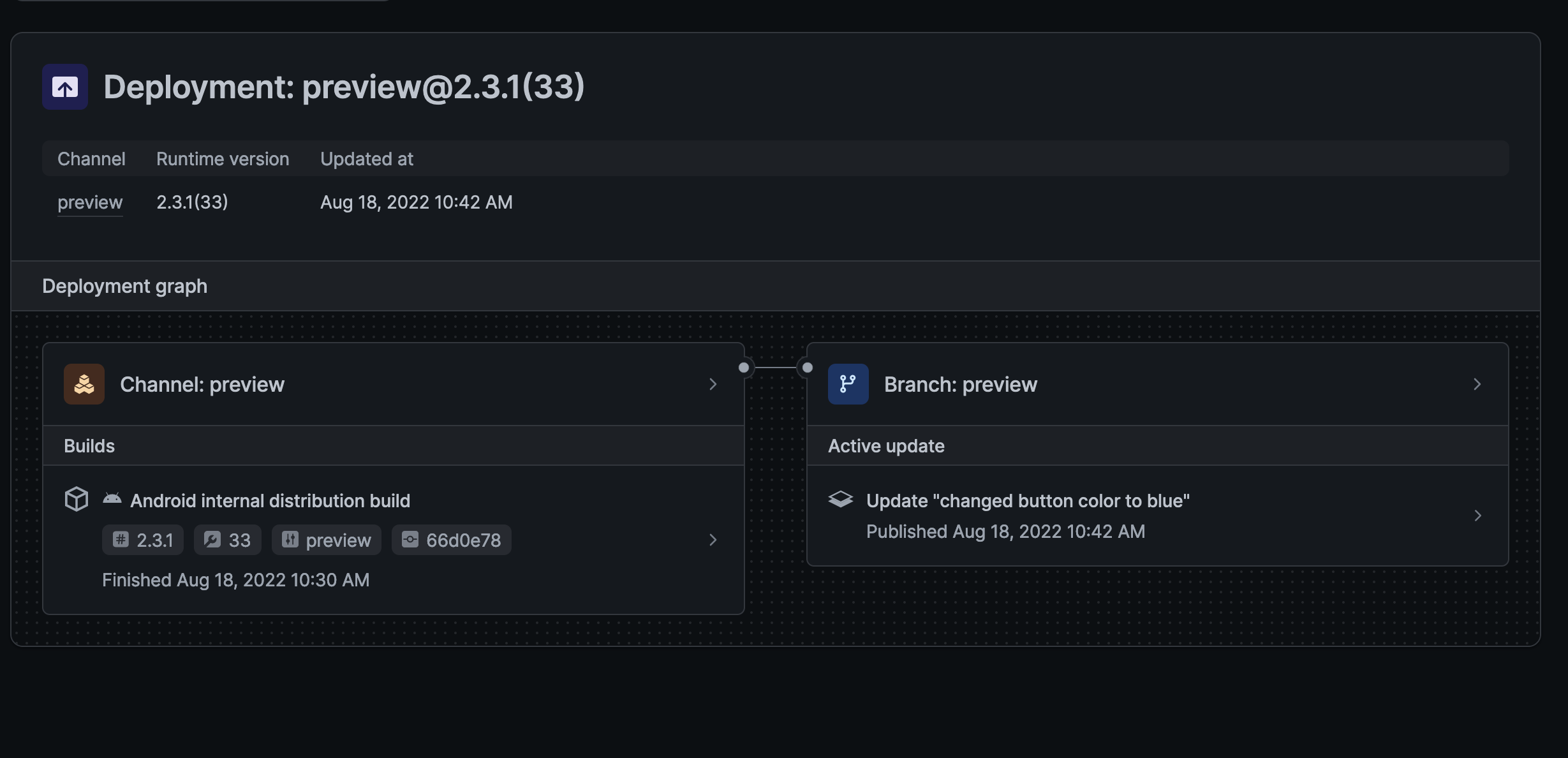
Now when I open the app to inspect the changes the app crash, and flipper crash log shows the following:
FATAL EXCEPTION: expo-updates-error-recovery

com.facebook.jni.CppException: Compiling JS failed: Wrong bytecode version. Expected 85 but got 84 Buffer size 4605178 starts with: c61fbc03c103191f54000000d3c2b752 and has protection mode(s): r--p

FATAL EXCEPTION: expo-updates-error-recovery
Process: com.mobilon.feedmecyprus, PID: 13006
com.facebook.jni.CppException: Compiling JS failed: Wrong bytecode version. Expected 85 but got 84 Buffer size 4605178 starts with: c61fbc03c103191f54000000d3c2b752 and has protection mode(s): r--p
	at com.facebook.react.bridge.queue.NativeRunnable.run(Native Method)
	at android.os.Handler.handleCallback(Handler.java:938)
	at android.os.Handler.dispatchMessage(Handler.java:99)
	at com.facebook.react.bridge.queue.MessageQueueThreadHandler.dispatchMessage(MessageQueueThreadHandler.java:27)
	at android.os.Looper.loop(Looper.java:236)
	at com.facebook.react.bridge.queue.MessageQueueThreadImpl$4.run(MessageQueueThreadImpl.java:228)
	at java.lang.Thread.run(Thread.java:923)
I am not sure if this is related to #18548 , but I am not sure how to solve it
After the crash, subsequent launches to the app does not wait the fallbackToCacheTimeout period and just shows the unupdated app.
I have included a snippet to troubleshoot expo updates using:
  async function onFetchUpdateAsync() {
    try {
      const update = await Updates.checkForUpdateAsync();
      NativeLog.logWithTag("rami-update", JSON.stringify(update));

      if (update.isAvailable) {
        await Updates.fetchUpdateAsync();
        await Updates.reloadAsync();
      }
    } catch (error) {
      NativeLog.logWithTag("rami-update", `Error fetching latest Expo update: ${error}`);
    }
  }
However when running this function in the app, the update.isAvailable if branch runs, the reload happens but still no update.
I hope I can get some help here
What platform(s) does this occur on?
Android, iOS
Environment
  expo-env-info 1.0.5 environment info:
    System:
      OS: macOS 12.5
      Shell: 5.8.1 - /bin/zsh
    Binaries:
      Node: 16.16.0 - ~/.nvm/versions/node/v16.16.0/bin/node
      Yarn: 1.22.19 - ~/.nvm/versions/node/v16.16.0/bin/yarn
      npm: 8.11.0 - ~/.nvm/versions/node/v16.16.0/bin/npm
      Watchman: 2022.07.04.00 - /usr/local/bin/watchman
    Managers:
      CocoaPods: 1.11.3 - /usr/local/bin/pod
    SDKs:
      iOS SDK:
        Platforms: DriverKit 21.4, iOS 15.5, macOS 12.3, tvOS 15.4, watchOS 8.5
    IDEs:
      Android Studio: 2021.2 AI-212.5712.43.2112.8609683
      Xcode: 13.4.1/13F100 - /usr/bin/xcodebuild
    npmPackages:
      expo: ^46.0.0 => 46.0.2
      react: 18.0.0 => 18.0.0
      react-dom: 18.0.0 => 18.0.0
      react-native: 0.69.4 => 0.69.4
      react-native-web: ~0.18.7 => 0.18.7
    npmGlobalPackages:
      eas-cli: 0.60.0
      expo-cli: 6.0.1
    Expo Workflow: managed
Minimal reproducible example
see summary. I gave all the info I can. If there is anything else, let me know
Issue Analytics
- State:

- Created a year ago
- Comments:8 (4 by maintainers)
 Top Results From Across the Web
 Top Related Medium Post
 Top Related StackOverflow Question
 Troubleshoot Live Code
 Top Related Reddit Thread
 Top Related Hackernoon Post
 Top Related Tweet
 Top Related Dev.to Post
 Top Related Hashnode Post
Applying #18548 using patch-package, solves it. I really think this needs to be mentioned somewhere until the fix is released. I spent so much time thinking I did something wrong when it was a bug in @expo/dev-server
closing because i believe this is solved by using the latest version of dependencies. ensure you have the latest
expopackage version