
Custom notification sound not working
See original GitHub issueSummary
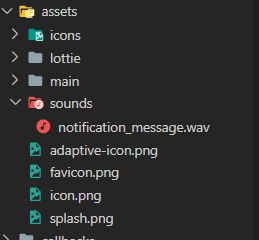
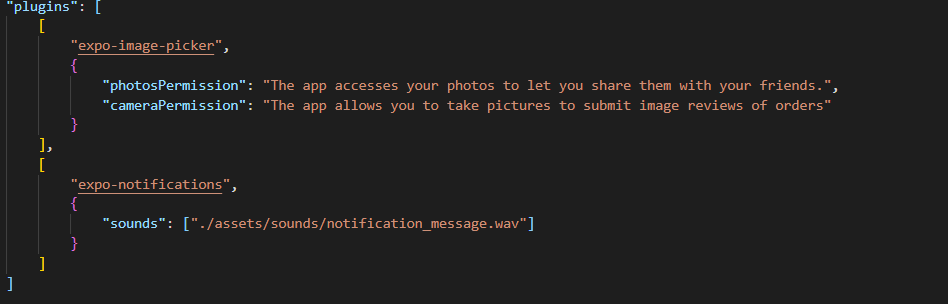
I am trying to play custom sound when receiving notification. I am using eas build. I have added a wav sound in the following location: “./assets/sounds/notification_message.wav”. I added it to app.json using the expo-notification config plugin, then created a custom-dev client using eas build -p android --profile development.
The problem is that when sending a push notification using fcm or scheduling a notification with the sound property: “notification_message.wav”, the message is received but no sound. I am testing on android 6, so there is no channelId is needed as mention in the documentation.
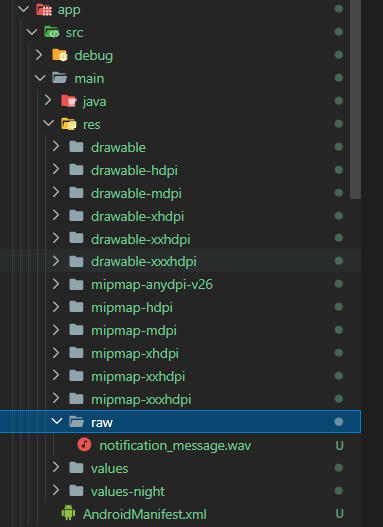
expo prebuild shows that it is found in res/raw
Managed or bare workflow? If you have made manual changes inside of the ios/ or android/ directories in your project, the answer is bare!
managed
What platform(s) does this occur on?
Android
Package versions
“expo-dev-client”: “~0.8.4”, “expo-notifications”: “~0.14.0”,
Environment
Expo CLI 5.2.0 environment info: System: OS: Windows 10 10.0.19042 Binaries: Node: 16.14.0 - C:\Program Files\nodejs\node.EXE npm: 8.3.1 - C:\Program Files\nodejs\npm.CMD npmPackages: expo: ^44.0.0 => 44.0.4 react: 17.0.1 => 17.0.1 react-dom: 17.0.1 => 17.0.1 react-native: 0.64.3 => 0.64.3 react-native-web: 0.17.1 => 0.17.1 Expo Workflow: managed
Reproducible demo
https://github.com/ramiel1999/custom-notification-sound
import Constants from "expo-constants";
import * as Notifications from "expo-notifications";
import React, { useState, useEffect, useRef } from "react";
import { Text, View, Button, Platform } from "react-native";

Notifications.setNotificationHandler({
    handleNotification: async () => ({
        shouldShowAlert: true,
        shouldPlaySound: true,
        shouldSetBadge: false,
    }),
});

export default function App() {
    useEffect(() => {
        registerForPushNotificationsAsync();
    }, []);

    return (
        <View
            style={{
                flex: 1,
                alignItems: "center",
                justifyContent: "space-around",
            }}
        >
            <Button
                title="Press to schedule a notification"
                onPress={async () => {
                    await schedulePushNotification();
                }}
            />
        </View>
    );
}

async function schedulePushNotification() {
    await Notifications.scheduleNotificationAsync({
        content: {
            title: "You've got mail! 📬",
            body: "Here is the notification body",
            data: { data: "goes here" },
            sound: "notification_message.wav",
        },
        trigger: { seconds: 2 },
    });
}

async function registerForPushNotificationsAsync() {
    let token;
    if (Constants.isDevice) {
        const { status: existingStatus } = await Notifications.getPermissionsAsync();
        let finalStatus = existingStatus;
        if (existingStatus !== "granted") {
            const { status } = await Notifications.requestPermissionsAsync();
            finalStatus = status;
        }
        if (finalStatus !== "granted") {
            alert("Failed to get push token for push notification!");
            return;
        }
    } else {
        alert("Must use physical device for Push Notifications");
    }

    return token;
}
Stacktrace (if a crash is involved)
No response
Issue Analytics
- State:

- Created 2 years ago
- Comments:16 (2 by maintainers)
 Top Results From Across the Web
 Top Related Medium Post
 Top Related StackOverflow Question
 Troubleshoot Live Code
 Top Related Reddit Thread
 Top Related Hackernoon Post
 Top Related Tweet
 Top Related Dev.to Post
 Top Related Hashnode Post
Well for some reason with scheduled notifications and notifications sent with fcm you need to pass the vibrate property. It doesnt make sense why the vibrate property is needed to trigger the custom sound but it is needed.
I encountered this issue as well. It’s only working if I include
vibrate:false