Docker compose Linux container error "The path must be absolute."
See original GitHub issueDescribe the bug
Running a new web app project from the VS templates via docker compose with Linux containers causes a ‘path must be absolute’ error in WebApplication.CreateBuilder
Adding ‘StaticWebAssetsEnabled’ to false project causes exception to go away, but breaks web site.
There are a bunch of other cases raised for this, but all now closed and marked as resolved. However, myself and several other users still appear to be experiencing in RC2.
Weird thing is, this was working fine yesterday and just started experiencing this morning. Rolling back my mornings changes made no difference and now I see the same problem creating a fresh, simple web app from the templates. Is there a hidden config folder or some such for VS / Docker that could need flushing to resolve the problem? Only thing I can think of, proper head scratcher.
@javiercn @ProgrammerAl @sloscialo @cetindogu
To Reproduce
Create .NET core web application with docker (linux)
Exceptions (if any)
Unhandled exception. System.ArgumentException: The path must be absolute. (Parameter ‘root’)
at Microsoft.Extensions.FileProviders.PhysicalFileProvider…ctor(String root, ExclusionFilters filters)
at Microsoft.Extensions.FileProviders.PhysicalFileProvider…ctor(String root)
at Microsoft.AspNetCore.Hosting.StaticWebAssets.StaticWebAssetsLoader.<>c.<UseStaticWebAssetsCore>b__1_0(String contentRoot)
at Microsoft.AspNetCore.StaticWebAssets.ManifestStaticWebAssetFileProvider…ctor(StaticWebAssetManifest manifest, Func2 fileProviderFactory) at Microsoft.AspNetCore.Hosting.StaticWebAssets.StaticWebAssetsLoader.UseStaticWebAssetsCore(IWebHostEnvironment environment, Stream manifest) at Microsoft.AspNetCore.Hosting.StaticWebAssets.StaticWebAssetsLoader.UseStaticWebAssets(IWebHostEnvironment environment, IConfiguration configuration) at Microsoft.AspNetCore.WebHost.<>c.<ConfigureWebDefaults>b__9_0(WebHostBuilderContext ctx, IConfigurationBuilder cb) at Microsoft.AspNetCore.Hosting.GenericWebHostBuilder.<>c__DisplayClass9_0.<ConfigureAppConfiguration>b__0(HostBuilderContext context, IConfigurationBuilder builder) at Microsoft.AspNetCore.Hosting.BootstrapHostBuilder.RunDefaultCallbacks(ConfigurationManager configuration, HostBuilder innerBuilder) at Microsoft.AspNetCore.Builder.WebApplicationBuilder..ctor(WebApplicationOptions options, Action1 configureDefaults)
at Microsoft.AspNetCore.Builder.WebApplication.CreateBuilder(String[] args)
at Program.<Main>$(String[] args)
Further technical details
Visual Studio 17.0.0 RC3 and .NET 6.0.0-rc.2.21480.5.
dotnet --info Output
.NET SDK (reflecting any global.json): Version: 6.0.100-rc.2.21505.57 Commit: ab39070116
Runtime Environment: OS Name: Windows OS Version: 10.0.19043 OS Platform: Windows RID: win10-x64 Base Path: C:\Program Files\dotnet\sdk\6.0.100-rc.2.21505.57\
Host (useful for support): Version: 6.0.0-rc.2.21480.5 Commit: 6b11d64e7e
.NET SDKs installed: 3.1.201 [C:\Program Files\dotnet\sdk] 3.1.300 [C:\Program Files\dotnet\sdk] 6.0.100-rc.2.21505.57 [C:\Program Files\dotnet\sdk]
.NET runtimes installed: Microsoft.AspNetCore.App 3.1.3 [C:\Program Files\dotnet\shared\Microsoft.AspNetCore.App] Microsoft.AspNetCore.App 6.0.0-rc.2.21480.10 [C:\Program Files\dotnet\shared\Microsoft.AspNetCore.App] Microsoft.NETCore.App 3.1.3 [C:\Program Files\dotnet\shared\Microsoft.NETCore.App] Microsoft.NETCore.App 6.0.0-rc.2.21480.5 [C:\Program Files\dotnet\shared\Microsoft.NETCore.App] Microsoft.WindowsDesktop.App 3.1.3 [C:\Program Files\dotnet\shared\Microsoft.WindowsDesktop.App] Microsoft.WindowsDesktop.App 6.0.0-rc.2.21501.6 [C:\Program Files\dotnet\shared\Microsoft.WindowsDesktop.App]
Issue Analytics
- State:

- Created 2 years ago
- Reactions:1
- Comments:26 (2 by maintainers)
 Top Results From Across the Web
 Top Related Medium Post
 Top Related StackOverflow Question
 Troubleshoot Live Code
 Top Related Reddit Thread
 Top Related Hackernoon Post
 Top Related Tweet
 Top Related Dev.to Post
 Top Related Hashnode Post
@p2pbsh, @ProgrammerAl I was able to reproduce the issue on a clean install of the latest VS 2022 and Docker Compose tools. I think the reason you are still seeing the issue after disabling Compose V2 is that I forget to mention you need to do a rebuild (or delete the static assets files) to force regeneration of that bad file. Once I did the rebuild the error went away for me.
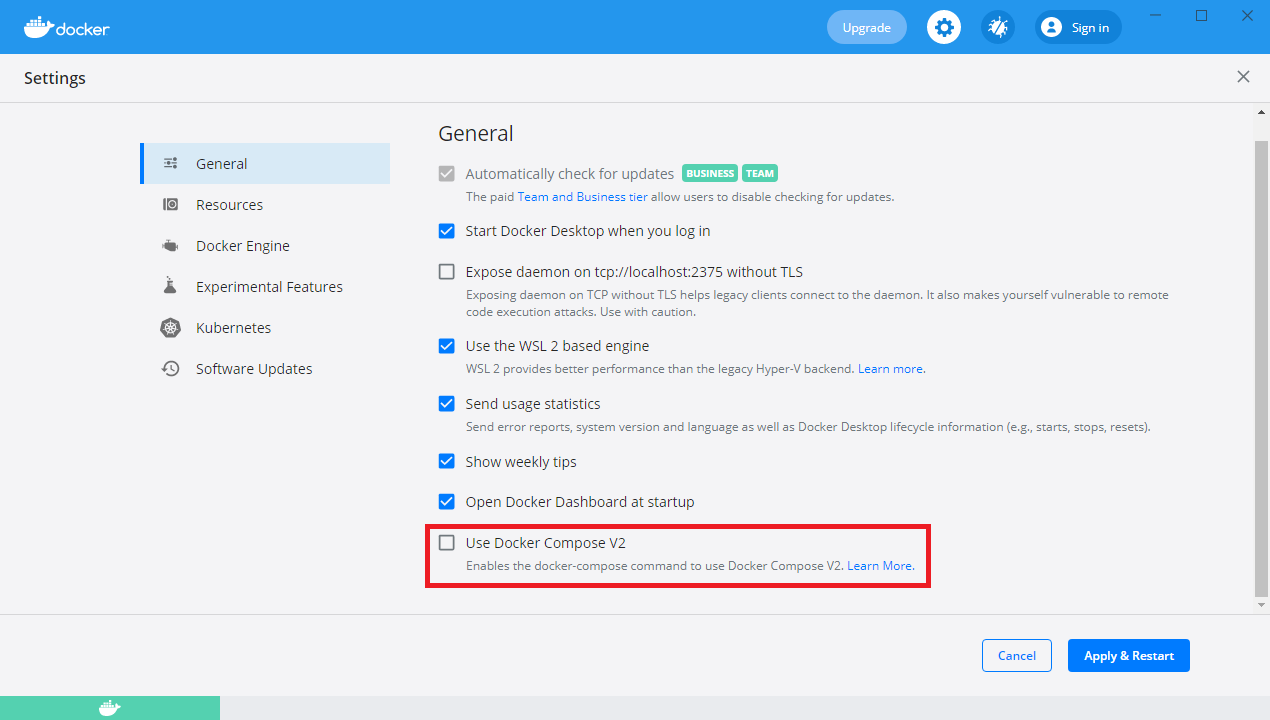
@p2pbsh I suspect you are seeing the same issue as in this bug: https://developercommunity.visualstudio.com/t/Not-able-to-debug-a-Blazor-Server-App-wi/1556545 There was a regression in docker-compose v2 that broke some of our handling for static assets files. If you disable docker-compose V2 in the settings that should unblock you: