
Module fs-extra doesn't get imported (Dependency issue)
See original GitHub issueExpected Behavior
I’m configuring a new .ts file for creating a custom action according to this page.
import fs from 'fs-extra'; should import the module defined in the following path: {rootDir}/node_modules/fs-extra
I followed the package.json from this gitrepo and added the module to the {rootDir}/package.json under the section devDepencencies (see image).
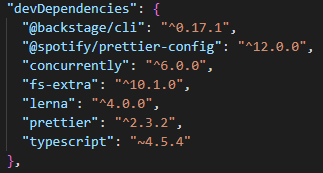
I also tried adding the dependency at {rootDir}/packages/backend/package.json but that still didn’t work and should be unnecessary.
Actual Behavior
Importing fs-extra from my packages/backend/src/plugins/scaffolder/actions/custom.ts causes the following error:
Could not find a declaration file for module ‘fs-extra’. ‘{root}/node_modules/fs-extra/lib/index.js’ implicitly has an ‘any’ type.
Try npm i --save-dev @types/fs-extra if it exists or add a new declaration (.d.ts) file containing declare module 'fs-extra';
I tried to add the package seperately with yarn add fs-extra in both the root and packages/backend directories
The error occured while executing a yarn tsc. It seems like the module is not exported the correct way. I'm not very familiar with dependencies in javascript frameworks. I tried to declare the module (what the error suggests) but it did nothing for me.
Issue Analytics
- State:

- Created a year ago
- Comments:9 (5 by maintainers)
 Top Results From Across the Web
 Top Related Medium Post
 Top Related StackOverflow Question
 Troubleshoot Live Code
 Top Related Reddit Thread
 Top Related Hackernoon Post
 Top Related Tweet
 Top Related Dev.to Post
 Top Related Hashnode Post
You’ll want to add
@types/fs-extrato thedevDependenciesthough. Try addingto
devDependenciesinpackages/backend/package.jsonand thenyarn installshould clear up any typescript errors.You also probably don’t want to add it to
devDependenciesif you want to use the package at runtime.fs-extrashould be listed in thedependenciessection instead.