
`func host start` stuck and not starting - connect ECONNREFUSED
See original GitHub issueHello, I’m having some problems trying to debug Python in VS Code with Azure Functions on Windows 10.
At first, after installing I had some problems because Powershell was not finding the command func host start. I had installed npm with nodist, but Powershell wasn’t finding the command so I installed nvm-windows which didn’t work either. I then fixed the problem by adding the PATH to node_modules in Enviroment variables. I got func starting and I was able to debug my application. But after the first run it didn’t work again.
I tried everything I could: removing the PATH I created, uninstall and install azure-functions-core-tools 2 and 3, uninstall nvm and install Node.js, install .NET Core SDK 2.2, delete my functions project and create a new one, restarting VS Code, restarting Windows… nothing works.
When I start debugging here is what happens:
Executing task: .venv\Scripts\activate ; func host start

Found Python version 3.7.5 (python).

                  %%%%%%
                 %%%%%%
            @   %%%%%%    @
          @@   %%%%%%      @@
       @@@    %%%%%%%%%%%    @@@
     @@      %%%%%%%%%%        @@
       @@         %%%%       @@
         @@      %%%       @@
           @@    %%      @@
                %%
                %

Azure Functions Core Tools (2.7.2254 Commit hash: ae06bd1a6012aa6a0859b5f30d3077947267d2b6)
Function Runtime Version: 2.0.13017.0
It stays like this for 5 minutes or more, after I get this pop message:
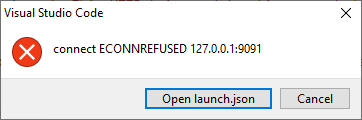
And terminal says:
The terminal process terminated with exit code: 1

Terminal will be reused by tasks, press any key to close it.
That’s all I have. It’s really strange to me that I got it working once, and it never worked again. Hope you can help me, and sorry if I’m not very precise with my explanations. If I missed something about my problem please ask me. Thanks!
Issue Analytics
- State:

- Created 3 years ago
- Comments:12 (2 by maintainers)
 Top Results From Across the Web
 Top Related Medium Post
 Top Related StackOverflow Question
 Troubleshoot Live Code
 Top Related Reddit Thread
 Top Related Hackernoon Post
 Top Related Tweet
 Top Related Dev.to Post
 Top Related Hashnode Post
you can try changing tasks.json " { “type”: “func”, “command”: “func host start”, “problemMatcher”: “$func-node-watch”, “isBackground”: true, “dependsOn”: “npm install” }
"
I am closing this issue as @pundergit has found a workaround. However, if this issue keeps occuring for others, I’d be happy to reopen.