
XMLHttpRequest & globalZoneAwareCallBack
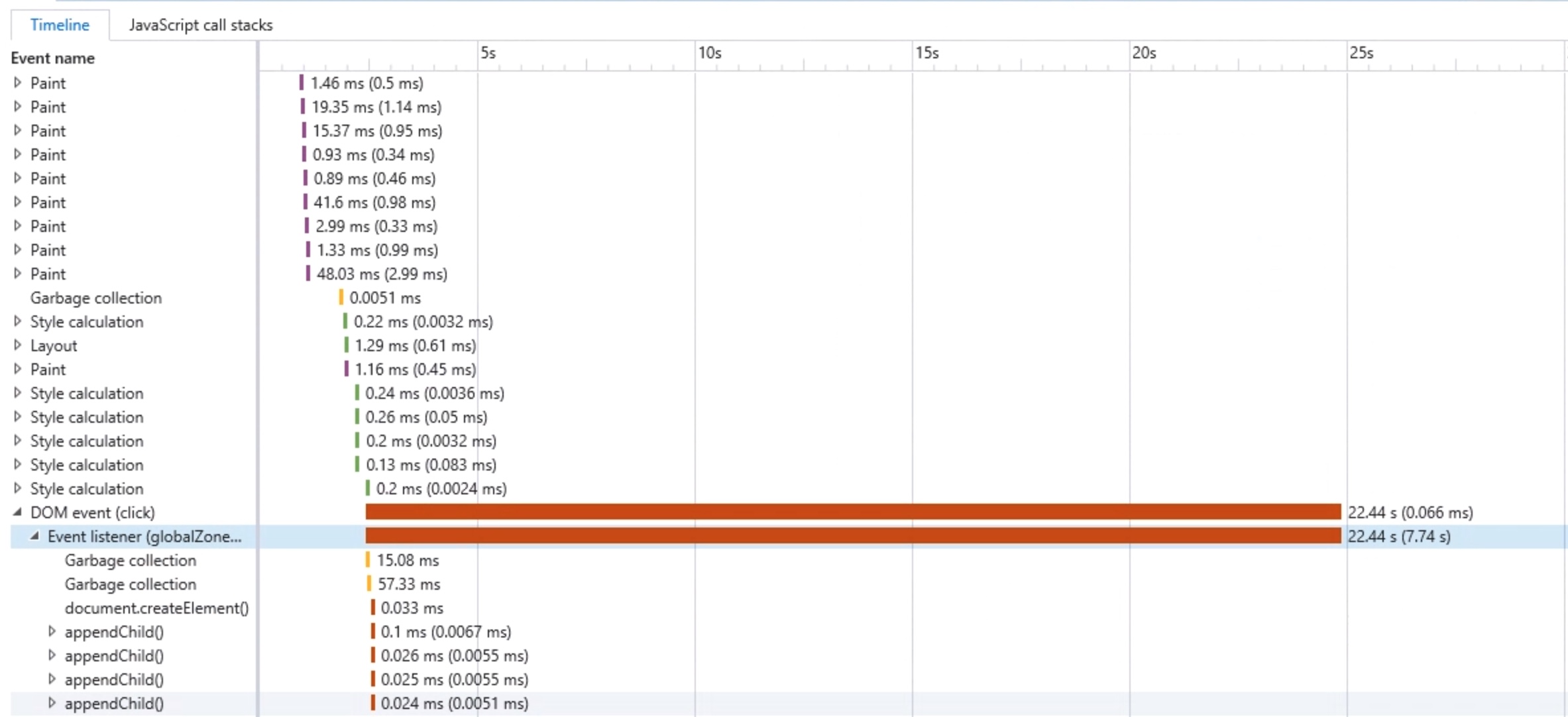
See original GitHub issueWe recently noticed a performance issue with IE11 in our angular 5 app that is not happening in other browsers. I start troubleshooting it using F12 developer tools in windows 10. Used both networks and performance tab in the debug tools and noticed XMLHttpRequest (networks) & globalZoneAwareCallBack (performance) are the main tasks that takes about 25 seconds to finish.
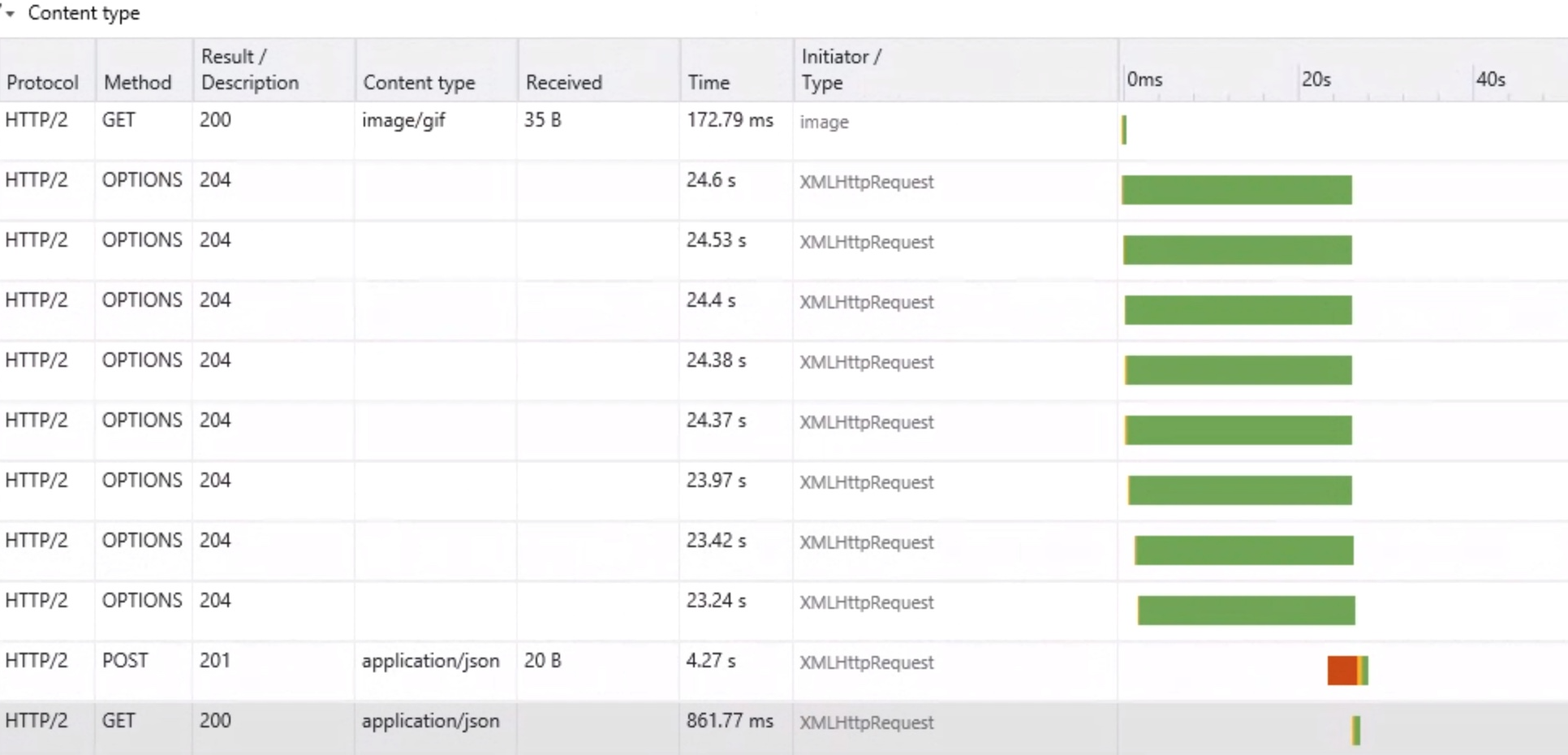
As you can tell from the screenshot, the OPTIONS request are taking so long to finish. My understanding is IE and other browsers send these CORS preflight before the actual request. Most browsers will process the response in 300-500 ms but for some reason IE 11 in windows 10 takes about 24 seconds. Hovering over the timing tab, it indicate the majority of the time is being used for “downloading” (the step after TTFB), which is weird since successful response for OPTIONS request usually is 204 with No Content.
I tried this again, but this time I used IE 11 in windows 8.1 instead. This time, IE 11 took around 6s for each and the result was aborted instead of 204. Also noticed there were some errors (SEC7118 & SEC7119) in console logs, which according to MS website here are removed from IE 11 from windows 10:
This requires the server to return an “Access-Control-Allow-Origin” header in its response headers, but one was not returned.
The specific operation of the request required both CORS support and preflighting on the server side, but preflighting failed.
These raise the question if the api is supporting CORS or not and the answer is yes. Also other browsers finish the OPTIONS request successfully. Not sure why IE 11 is acting different in two version of windows. I assume this is IE 11 related and out of the scope for this issue, so I moved on and troubleshoot using the performance tab.
In performance tab, there is DOM event that is taking about 22 seconds and once I expand it i noticed globalZoneAwareCallBack event listener. Unfortunately I don’t see any call stack under Javascript call stack, so I am not sure where the globalZoneAwareCallBack is struggling.
I wonder if there is any correlation between XMLHttpRequest and globalZoneAwareCallBack here. The XMLHttpRequest OPTIONS request takes about 25 seconds while the globalZoneAwareCallBack takes about 22 + few second tasks before that. I wonder if any of these OPTIONS request is blocking the globalZoneAwareCallBack tasks or vice versa.
I am not sure this could be a bug related to zonejs but noticed some other issues that was related #691, #971 and both of them are closed now. Opening this issue to get some feedback regarding where globalZoneAwareCallBack or XMLHttpRequest is possibly having issue while I am working reproducing this issue in a separate repo.
Packages: “@angular/animations”: “^5.2.0”, “@angular/common”: “^5.2.0”, “@angular/compiler”: “^5.2.0”, “@angular/core”: “^5.2.0”, “@angular/forms”: “^5.2.0”, “@angular/http”: “^5.2.0”, “@angular/platform-browser”: “^5.2.0”, “@angular/platform-browser-dynamic”: “^5.2.0”, “@angular/platform-server”: “^5.2.0”, “@angular/router”: “^5.2.0”, “zone.js”: “^0.8.20”
IE-11 Windows 10 version: 11.15.16299.0
IE-11 Windows 8.1 version: 11.0.9600.18953
Issue Analytics
- State:

- Created 5 years ago
- Comments:11 (4 by maintainers)
 Top Results From Across the Web
 Top Related Medium Post
 Top Related StackOverflow Question
 Troubleshoot Live Code
 Top Related Reddit Thread
 Top Related Hackernoon Post
 Top Related Tweet
 Top Related Dev.to Post
 Top Related Hashnode Post
@aortez , sure , like you said, it seems to be a performance issue of
ngFor on IE11, I will check it inangular side.@SuyogShah (and anyone else facing this issue), I don’t have a solution to the performance problem, but I will share the workaround that my group has chosen to follow. Maybe it will help you, maybe not. Keep in mind that our IE11 user base is not large, so we are just aiming to make their experience tolerable, and that will be good enough for now.
First, the issue we faced is that we are rendering a page that has a number of
<select>elements populated with many options via anngForand load times were very slow. Let’s say there were 10<select>'s and the total render time was 5 seconds. We worked around the issue of initial slow page load time by delaying rendering the drop downs until the user clicked on them. This results in a overall sort of slow user experience… the page loads much quicker, but the user has to wait 0.5 seconds (the initial 5 seconds / number of<select>'s rendered) to render each drop down when they click on it.I can’t share the actual code, but here is a sketch of the template for my ‘custom select’ component. I’m using a ‘trigger’ element to control whether a list is shown. It took me a while of playing around to get the behavior to be consistent across browsers, so if you do go down this route, good luck!